Q4 is when most online sellers make their best money of the year, and it is also when many of them run short of cash. Good ecommerce cash flow management simply means knowing when money leaves your account, when it comes back, and keeping enough in between so orders never stop. This guide shows print-on-demand sellers how to map that gap, size a Q4 buffer and keep production running from October to the last Christmas order.
Key takeaways

Print on demand removes stock costs, but you still pay for each order before the marketplace pays you.
Map when money goes out and when payouts come in, for every channel you sell on.
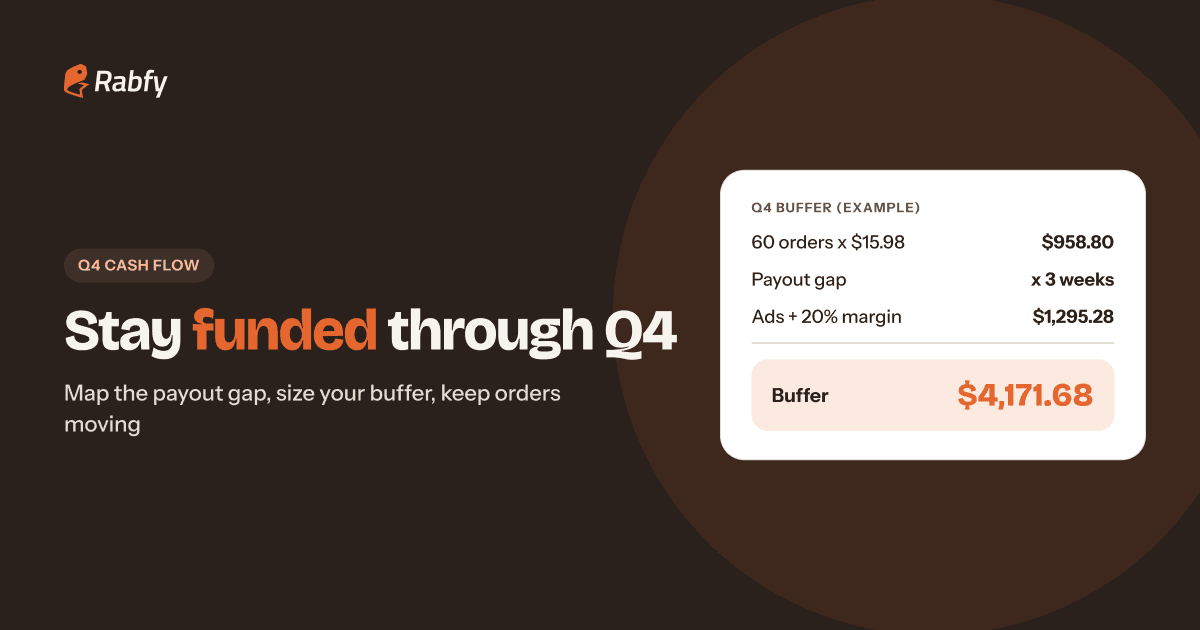
Size your buffer: peak-week orders x cost per order x payout gap in weeks, plus ads and a 20% margin.
Top up a wallet once instead of paying order by order, and check the balance daily in peak weeks.
Why Q4 cash flow is different for print-on-demand sellers
Print on demand removes the biggest cash problem in retail: you do not buy stock months before you sell it. You pay for a product only after a customer orders it. That is a real advantage, and it is why print on demand jewelry is a good way to start a brand with little money.
But there is still a timing gap. The moment an order comes in, you pay for production and shipping. The money from the customer usually reaches your bank days or weeks later. In a normal month, that gap is small. In Q4, when orders can double or triple in a single week, the gap grows fast.
Three things make Q4 cash flow harder than the rest of the year:
 More orders at once. Black Friday week can bring more orders in five days than a slow month does in four weeks.
- Higher ad spend. Ads are billed now, but the sales they bring are paid out later.
- More holds and refunds. Marketplaces may hold funds for new or fast-growing shops, and holiday returns arrive in January.
Map your print on demand cash flow: money out vs money in
Before you plan a buffer, write down your own cash cycle. It has two sides: when you pay costs, and when you receive payouts. Most cash problems come from looking at only one side.
When money goes out
- Product cost, shipping, processing fee and tax, paid when the order is placed.
- Marketplace and payment fees, usually taken from your payout.
- Ads, charged to your card daily or each time you reach a billing limit.
- Apps, subscriptions, samples and packaging extras, monthly or one-time.
When money comes in
Each sales channel pays you on its own schedule. Here is how the main ones work as of 2026, at the time of writing. Schedules change, so always confirm on each platform's official help page.
| Channel | How payouts work (as of 2026) |
|---|---|
| Shopify Payments (US) | Payouts typically arrive 3–5 business days after payment is captured. New stores can have longer settlement times at first. |
| Etsy | Choose daily, weekly, biweekly or monthly deposits. New sellers start on weekly deposits (Mondays). A reserve can apply to new shops. |
| Amazon | From March 12, 2026, funds become available for disbursement 7 days after Amazon confirms delivery (often called DD+7). |
| eBay | Daily, weekly, biweekly or monthly payouts. After a payout starts, funds usually take 1–3 business days to clear. |
| Rabfy Store | The customer pays Rabfy. Rabfy deducts costs and pays you the rest on Net 15 terms. |
Now look at the gap. On Amazon, for example, you pay for production on day 0. The order is made in 1–3 days, ships, travels to the customer, and only then does the 7-day clock start. That can easily mean two to three weeks between paying the cost and receiving the sale.

How to size your Q4 cash buffer (with an example)
A cash buffer is the money you keep ready to pay for orders before payouts arrive. You can size it in five steps:
- 1Estimate your peak week. Use last year's best week. If this is your first Q4, multiply a normal week by 2 or 3.
- 2Find your cost per order. Product + shipping, plus processing fee and tax, from your price sheet.
- 3Count your payout gap in weeks. Use your slowest channel. If it takes about three weeks from order to payout, use 3.
- 4Multiply. Peak-week orders x cost per order x payout gap in weeks.
- 5Add ads and a safety margin. Add planned ad spend for the same weeks, then add 20% for refunds, reships and surprises.
Here is a worked example with round numbers. It is only an example. Use your own costs, channels and order counts.

The total can look large, but you do not need all of it on day one. You need it as orders arrive, and payouts start coming back after the first few weeks. The buffer protects you during the gap, which is exactly when most sellers get stuck.
Build a simple 13-week Q4 cash plan
You do not need accounting software for this. A spreadsheet with one row per week, from the start of October to the end of December, is enough. That is 13 rows.
Use these five columns:
- Week: the start date of each week.
- Expected orders: split by channel if you sell on more than one.
- Cash out: order costs, ads, tools and other bills.
- Cash in: payouts you expect to land that week, based on each channel's schedule.
- End balance: last week's balance + cash in − cash out.
Mark any week where the end balance drops below one week of order costs. That is your warning sign. Plan a top-up, lower ad spend for that week, or move money from savings in advance, not on the day it runs out.

Want the full list of dates to plan around? Our Black Friday and Cyber Monday checklist breaks the season into weekly tasks, starting 40 days out.
Use a seller wallet to stop paying order by order
Many sellers pay for each order separately, with a card, at the moment they place it. That works with five orders a week. In Q4 it becomes a problem: dozens of small charges, card limits, declined payments at the worst time and no clear view of what you have spent.
A prepaid seller wallet works differently. You top up once, and each order's cost is taken from that balance automatically. Your cash plan then becomes one simple question: is the balance above my minimum?
To use a wallet well in Q4:
- Set a minimum balance. For example, one week of peak order costs. Top up when you reach it, not when it hits zero.
- Check the balance daily in peak weeks. A 60-order week uses the wallet much faster than a 15-order week.
- Review the transaction record weekly. Compare it with your sales to see your real margin for that week.
- Keep ad money separate. The wallet is for orders. Pay ads from a different card so one never blocks the other.

If you sell on Shopify, orders import automatically and the cost is paid from the wallet, so no order waits for you. See how the connection works in our guide to Shopify print-on-demand fulfillment. For Amazon, Etsy and eBay, you place each sale as a custom order in the dashboard, and the cost comes from the same wallet.
Protect your cash from refunds, holds and surprises
Even a good plan can be hit by events you do not control. Build these habits before November:
- Expect holds. New shops and shops with a sudden jump in sales can see reserves or longer settlement times. Read your channel's policy now.
- Plan for January. Holiday returns and refunds come after the season. Keep part of your December profit until the return window closes.
- Reduce chargebacks. Clear photos, accurate descriptions and tracking on every order help you avoid and win disputes.
- Grow ads only as fast as cash. If you double your daily ad budget, you roughly double the buffer you need.
- Keep a tax reserve. Set aside a fixed share of profit each week so tax season is not a shock.
Your weekly 15-minute Q4 cash routine
Put a 15-minute block in your calendar every Monday from October to December, and follow the same five steps:
- 1Update last week's actual orders, costs and payouts in your sheet.
- 2Check each marketplace for pending payouts, holds or reserves.
- 3Compare your wallet balance with next week's expected orders.
- 4Top up if the balance is below your minimum.
- 5Adjust ad budgets if the next two weeks look tight.
This routine takes less time than handling one delayed Black Friday order, and it keeps you calm when the busy days arrive.
In Q4, profit is what you earn. Cash is what keeps the orders moving. Plan for both.
Frequently asked questions
What is ecommerce cash flow management?
It is planning when money leaves your business (product costs, shipping, ads, fees) and when it comes back (payouts), so you always have enough to pay for the next orders.
How much cash do I need for Q4 as a print-on-demand seller?
Multiply expected peak-week orders by your cost per order and by your payout gap in weeks. Then add planned ad spend and a safety margin of about 20%. Use your own numbers.
Why is my marketplace payout delayed?
Common reasons are new-seller reserves, a sudden rise in sales, holds that start after delivery, or a change of bank details. Check your channel's help center for the exact reason.
Does print on demand need money up front?
You do not buy stock in advance. You pay for a product only after a customer orders it, but you still need cash to cover order costs until payouts arrive.
How does the Rabfy Wallet work?
You top up once. Each order's product and shipping cost is deducted automatically, and you get a clear record of every transaction.
Keep every Q4 order moving
Open a free Rabfy account, top up your wallet once and let each order pay for itself. No subscription, no contract and no card needed to start.
Start selling free